
 100% Free Forever • No TV Pro Needed
Unlimited Watchlists
for TradingView.
Break TradingView's single watchlist cap. Keep all your watchlists docked directly beside your charts. Import complete Chartink, Screener.in & Finviz screeners in 1 click, unlock free Finviz CSV exports, and cycle symbols with Spacebar.
No account required • No tracking • 100% Private • Zero monthly fees
- Unlimited Watchlists & Tabs
- Color Tag & Untagged Filter
- 1-Click Chartink, Screener.in & Finviz Sync
- Free Finviz CSV Export (Elite Unlocked)
- Live Re-Sync Buttons
- 1,800+ Stocks per List
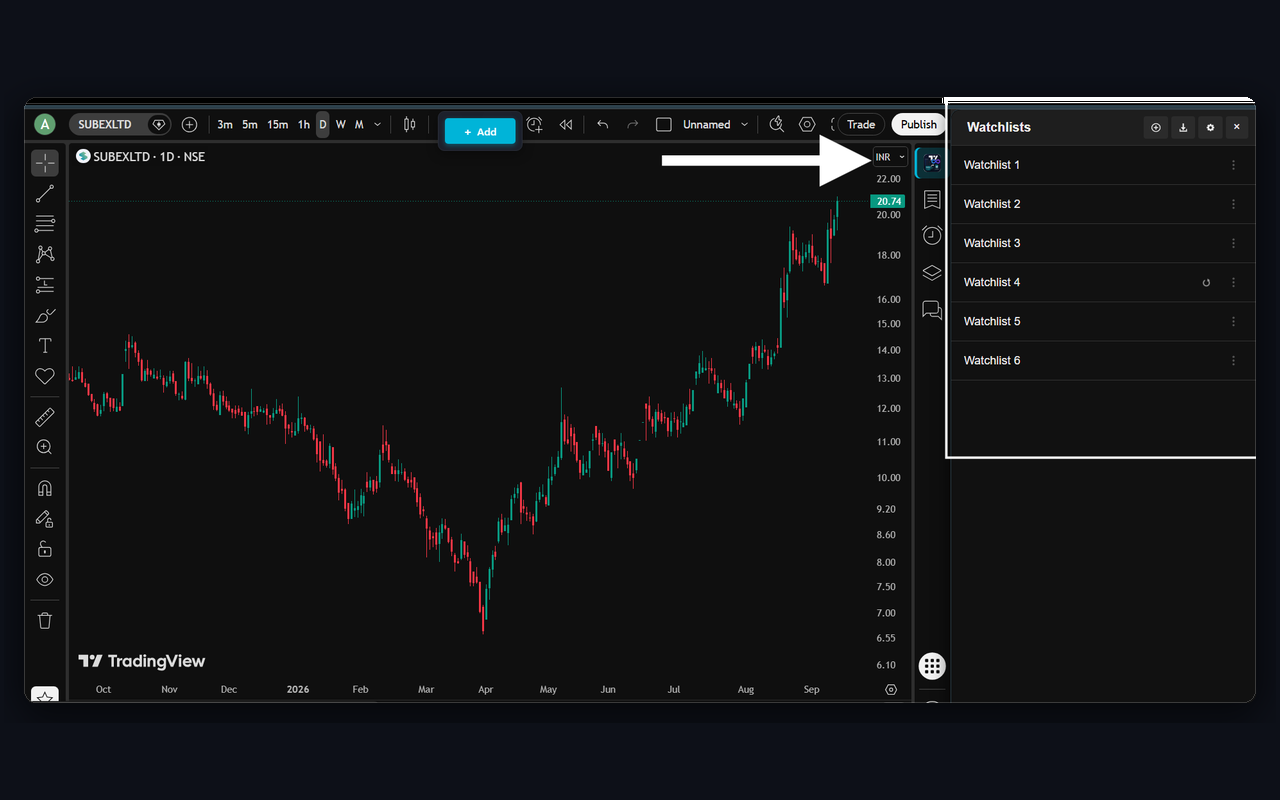
Everything a Watchlist Should Do
TradingView free plan caps you at one 30-item list. Our extension removes the limits so you can organize your trading strategy with precision.
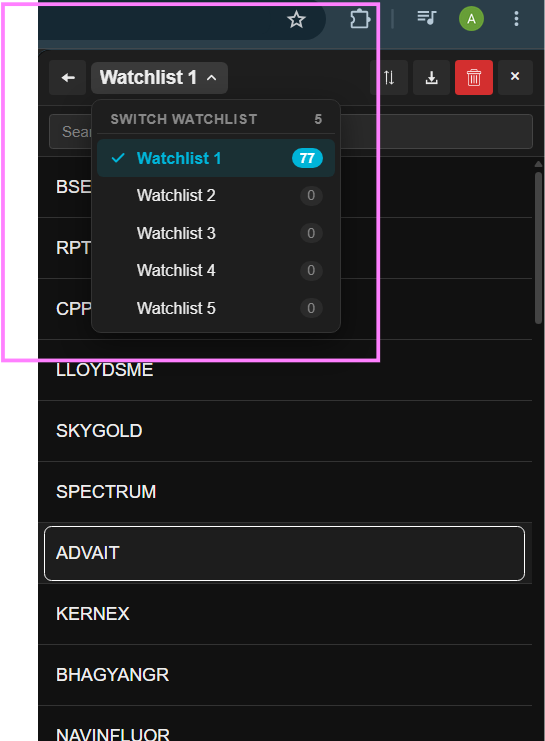
Unlimited Custom Watchlists
Create separate lists for Swings, Breakouts, High Volume, Positional, and Scalping. Organize, rename, and manage without hitting paywalls.
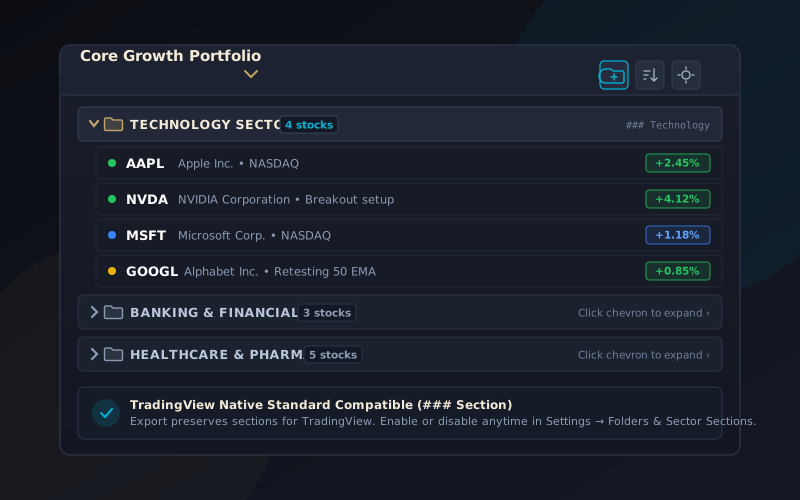
Watchlist Folders
Group related watchlists into collapsible category folders (Portfolios, Swing Setups, Screener Scans) to keep your sidebar clean and structured.
Sector Sections
Divide stocks inside any watchlist into collapsible sector groups (Technology, Banking, Pharma) with live stock counters and clean organization.
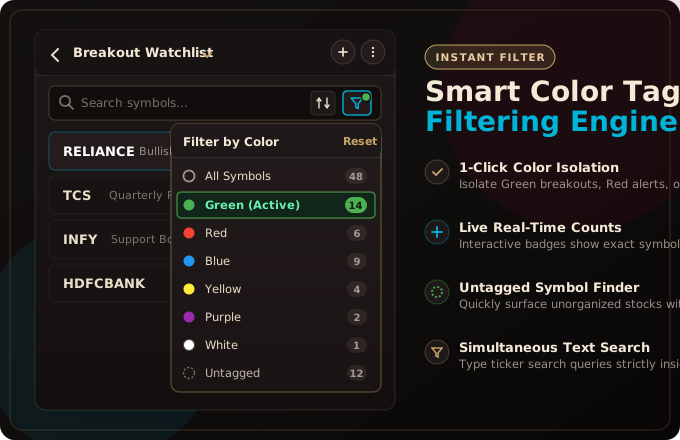
Smart Color & Untagged Filter
Filter active watchlists by any color flag or isolate untagged stocks in 1 click. Features live counter badges, glowing status indicators, and simultaneous keyword search.
1-Click Chartink Screener Import
Save entire Chartink screeners into your TradingView charts with 1 click. Automatically brings over all pages of scan results without any manual copying.
1-Click Screener.in Import
Import all matching stocks from any Screener.in screen at once. BSE stocks appear with real company names so you can open their charts instantly.
Finviz Screener & Free CSV Export
Quickly import thousands of US and global stocks from Finviz into TradingView, and download full CSV spreadsheets for free without needing Finviz Elite.
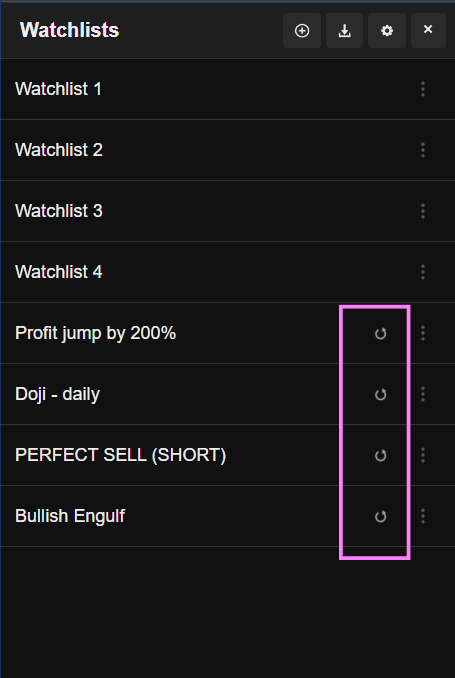
Dedicated Screener Re-Sync
Imported Chartink, Screener.in, and Finviz lists remember your scan. Click the circular re-sync button inside the panel to refresh today's scan results in seconds.
Bulk CSV, TXT & Excel Import
Instantly paste or upload ticker symbols from broker holdings (Zerodha, Groww, AngelOne, Interactive Brokers) or spreadsheet watchlists.
10,000+ Symbols & Rapid Search
Search across 10,000+ symbols. Smoothly loads and manages 1,800+ stocks in a single watchlist with zero browser slowdown.
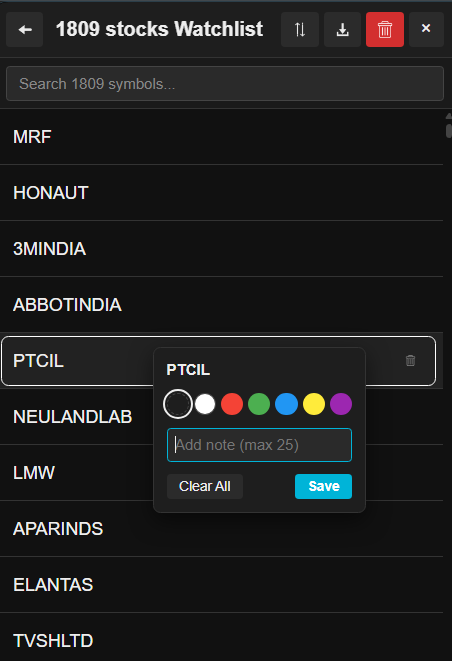
6 Color Tags & Trade Notes
Right-click any ticker in your list to assign color flags (Green, Blue, Gold, Purple, Red, Cyan) and add custom catalysts like "Breakout > 450".
Keyboard Shortcuts & Rapid Switching
Use ↓ / ↑ to cycle stocks, → / ← to switch watchlists, and Enter to open charts.
Floating Add Button on Charts
Studying any chart on TradingView? Click the floating + Add button on the chart toolbar to quickly save the symbol to any of your watchlists.
1-Click Backup, Restore & Export
Full data portability. Download a complete JSON backup of all your lists and notes, or export ticker symbols as CSV or plain text.
Import Chartink Screeners Directly Into TradingView
Indian traders run scans on Chartink and chart on TradingView. Stop wasting time copy-pasting symbols one by one:
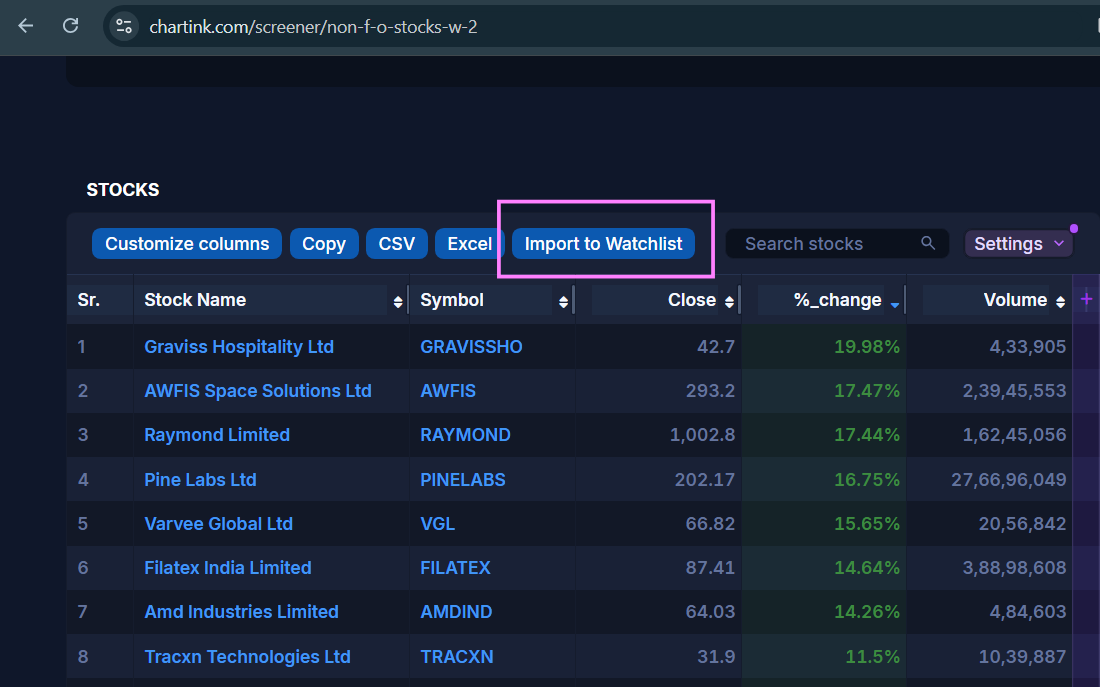
- Run your scan on Chartink: Open any pre-built or custom screener on chartink.com.
- Click "Import to Watchlist": Look for the blue "Import to Watchlist" button right above the results table. One click saves all matching stocks into TradingView.
- Re-Sync with 1 click: Inside your TradingView side panel, click the circular ↺ Sync button anytime to pull the newest scan results.
Import Screener.in Screens into TradingView
Scout fundamental scans on Screener.in and chart price action directly on TradingView without manual work:
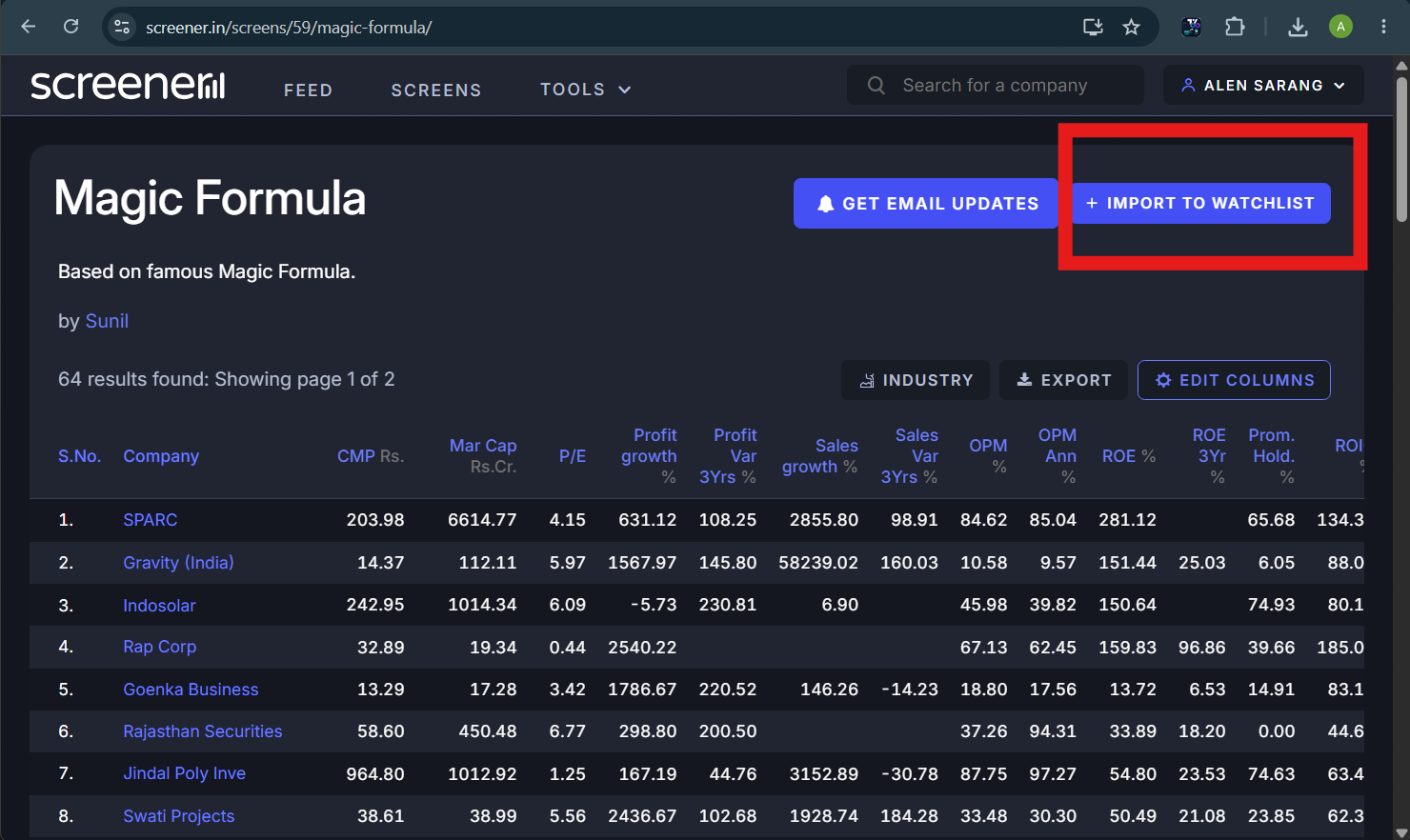
- Open any screen on Screener.in: Run screens like Growth Stocks, Debt-Free Companies, High ROE, or Low PE on screener.in.
- Click "Import to Watchlist": Look for the button right next to the Export option. It immediately saves all matching stocks across every page into your docked watchlist.
- Real Company Names & 1-Click Refresh: BSE stocks show up with their real company names instead of confusing numbers, so you can open charts right away. Click Re-Sync anytime to pull today's latest scan results.
Import Finviz Screeners & Unlock Free CSV Exports
The ultimate companion for US and global market traders. Screen technical and fundamental setups on Finviz with zero barriers:
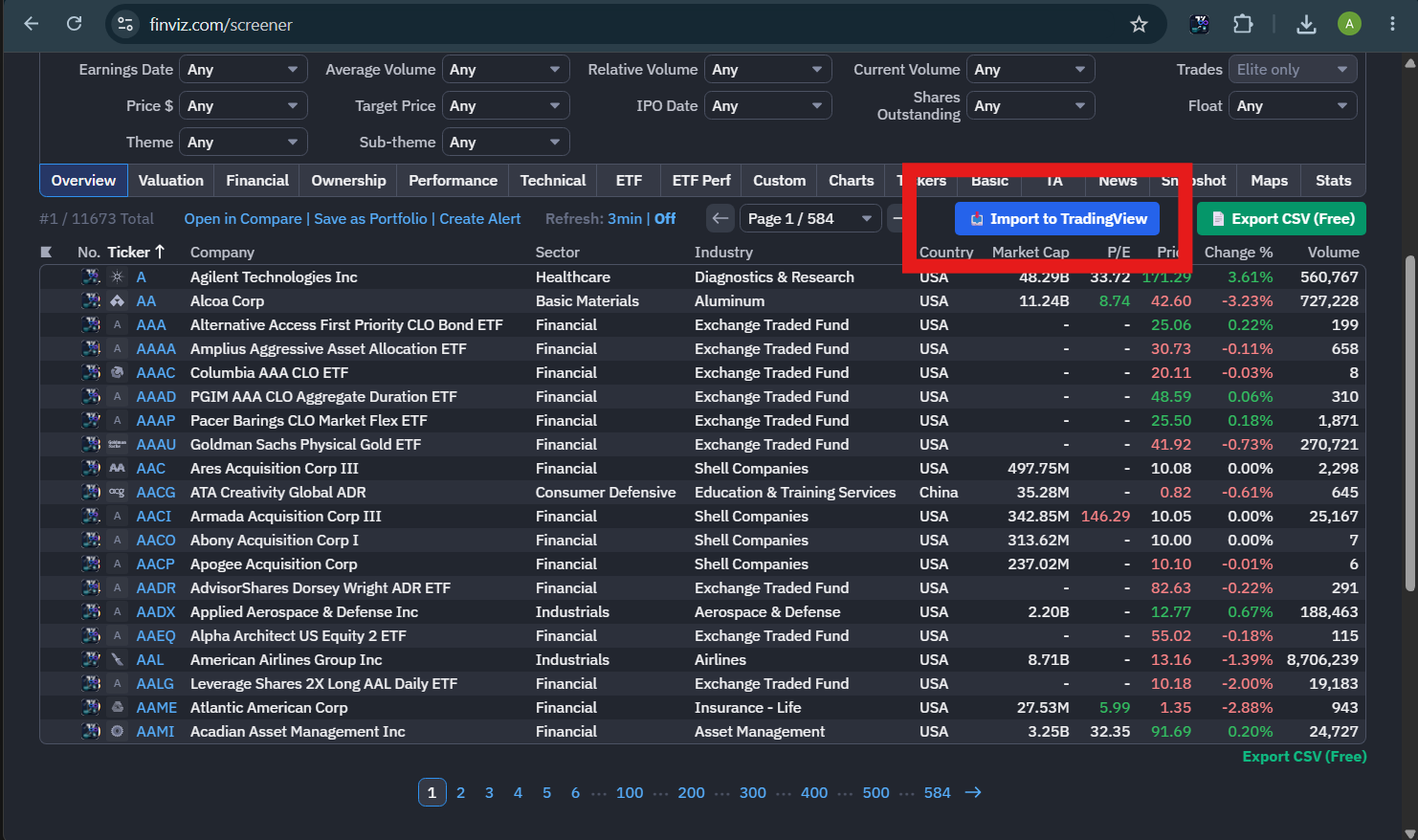
- Run scans on Finviz.com: Filter by technical patterns, earnings surprises, or fundamentals on finviz.com.
- 1-Click "Import to TradingView": Saves 1,000+ matching stocks into your watchlist in seconds, complete with 1-click Re-Sync to refresh anytime.
- Free CSV Downloads (Without Finviz Elite): Download the current page or all matching stocks into a clean Excel or CSV spreadsheet without paying for a Finviz Elite subscription.
- Open Charts in 1 Click: Click the small TradingView icon next to any stock name or on quote pages to jump straight to its chart.
Up and Running in 60 Seconds
Zero configuration. Works smoothly right out of the box with your existing TradingView setup.
Install & Pin Extension
Add to Chrome and pin the extension icon in your browser toolbar for instant 1-click access from any tab.
Open on TradingView
Click the dedicated Watchlist icon located directly on TradingView's right tool dock (topmost button).
Create or Import Lists
Create unlimited custom lists, sync Chartink, Screener.in, or Finviz screeners, or bulk paste CSV / Excel ticker files.
Fly Through Charts
Cycle stocks with ↓ / ↑, switch lists with → / ←, and press Enter to open charts. Right-click tickers to color code or add setup notes.
Crafted for Serious Technical Traders
High-contrast, distraction-free, and designed to live right alongside your TradingView charts.
In-Depth Trading Guides
Master your workflow with our detailed step-by-step guides for TradingView and Chartink.
TradingView Watchlist Limit Guide
Understand the official free plan limits (1 list, 30 items) and how this extension bypasses them without paying $14.95–$59.95/month.
Read the guide →Chartink to TradingView Sync
Complete guide on how to automatically pull screener scans into TradingView watchlists and refresh them with a single click every morning.
Read the guide →CSV & Excel to TradingView
Turn broker portfolio exports (Zerodha, Groww, AngelOne, Interactive Brokers) or Excel sheets into clickable TradingView watchlists in seconds.
Read the guide →Frequently Asked Questions
Everything you need to know about the extension, features, and privacy.
Yes — 100% free forever. There are no paid upgrades, no locked features, no monthly subscriptions, and no advertisements. It is an independent open tool built for the trading community.
TradingView's free plan restricts you to a single 30-item watchlist. This extension maintains its own independent watchlists directly in your Chrome browser side panel and right toolbar. Because the lists live in your browser, you can create unlimited custom watchlists and cycle charts on TradingView without paying for TradingView Pro/Essential.
Yes! You have two levels of clean organization: (1) Watchlist Folders in the Watchlists Overview to group multiple watchlists into collapsible categories (such as Portfolios, Swing Trades, or Screener Scans), and (2) Sector Sections inside any active watchlist to split stocks into named sector groups (e.g. Technology, Banking, Pharma) with live counters. You can toggle this feature on or off anytime in the Settings menu (⚙️).
When you visit any screener page on chartink.com, you will see a blue "Import to Watchlist" button right above the results. Clicking it pulls all symbols across all pages into a new watchlist in TradingView named after the scan. The watchlist remembers your scan, giving you a dedicated ↺ Re-Sync button to update the scan results daily with one click.
When you open any screen on screener.in/screens/, an "Import to Watchlist" button appears next to the Export button. Clicking it saves all matching stocks across every page into TradingView in seconds. BSE stocks are shown with their real company names instead of confusing numbers, and you can click the ↺ Re-Sync button anytime to refresh today's scan.
On finviz.com, you will find two buttons: "📥 Import to TradingView" and "📄 Export CSV (Free)". One click imports thousands of US and global stocks into your TradingView charts in seconds, complete with 1-click Re-Sync. The CSV export lets you download complete stock data into Excel spreadsheets for free, without needing a paid Finviz Elite subscription.
Free TradingView caps you at only 30 stocks. Our extension engine has been rigorously tested with 1,800+ stocks in a single list (such as the entire NSE active universe) with instant search filtering, zero lag, and instant chart switching via Spacebar.
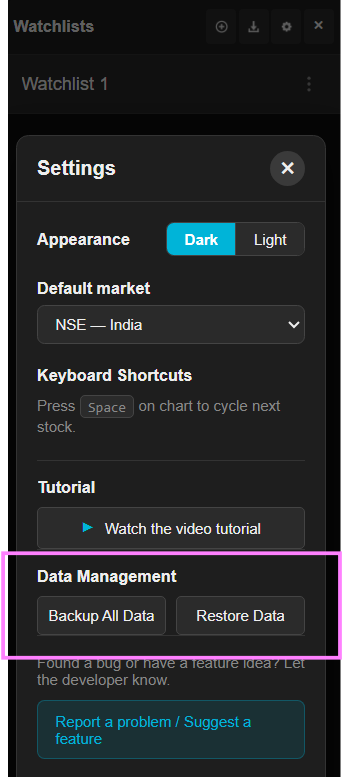
All your watchlists, stock symbols, color tags, and notes are stored 100% locally in your browser using Chrome's secure storage.local API. No data is ever sent to any remote server. To move your watchlists between computers, simply click "Backup All Data" in Settings to download a .json file, and click "Restore Data" on your new computer.
None. Zero analytics, zero user tracking, zero logging. The only network requests made are directly to Chartink.com, Screener.in, or Finviz.com (when you choose to import or re-sync a scan) and TradingView.com (to load charts). Read our full Privacy Policy.
No. This is an independent open-source tool created by individual developer Alen Sarang Satheesh. It is not affiliated with, endorsed by, or sponsored by TradingView, Chartink, Screener.in, or Finviz. All trademarks belong to their respective owners.
Trade Without Watchlist Limits Today
Free, private, and seamlessly integrated into your TradingView charts.
Add to Chrome — 100% Free